Sabtu, 20 Februari 2016

PhotoScape 3.7

PhotoScape 3.7

Take snapshots of the screen, edit photos, create mosaics and animated GIFs, convert raw formats and search for look-alikes on the Internet
Most image editors cannot compete with the sharks in the image editing category. As a consequence, they prefer to pack the basic features without sacrificing ease of use, which results in a large crowd of fans. PhotoScape belongs to this category, bundled with the most common image manipulation tools, while preserving a fun and accessible environment.

Structured and simple-to-handle GUI

You are required to go through a pretty simple installation process, yet you should be careful, as it offers to download some third-party products. After you finalize it, you are brought to a pretty simple and well-organized interface.
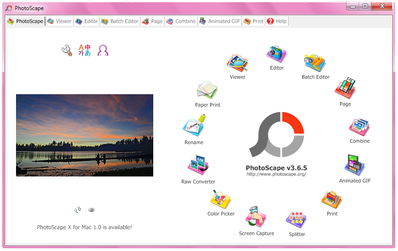
The main window is minimal and encloses a circle with animated icons which stand for different modules. Clicking on one of these brings you to some pretty familiar windows, regardless of the operation selected. This paired with some comprehensive Help contents ensure that all user categories can handle PhotoScape without facing any kind of difficulties.

View pictures and edit them, in a single or batch mode

This program comprises quite a large number of options so that you can easily manage and edit your images. First and foremost, you should know it is possible to use a viewer, packed with a folder structure to help you select images faster.
In addition to that, take advantage of a pretty basic editor. It lets you resize, crop, rotate and flip items, as well as adjust the brightness, sharpness, backlight and contrast, and apply some of the many effects integrated. This tool also has a counterpart which enables you process multiple files in the same time.

Create animated GIFs, take snapshots and convert raw formats

You can also create composites of several images, animated GIFs with custom change time, effect and size, while it is also possible to capture the entire screen, a selected area of it or a specified window.
Last but not least, you can make use of a color picker, rename multiple pictures in one single session, search for look-alikes on the Internet, and convert raw photos from formats such as DNG, CRW, RAF, NEF, ORF and DCR to one of the most common extensions, namely JPG, PNG, JPEG, GIF, BMP and TIF.

Conclusion and performance

CPU and memory usage is quite low at all times which means that the computer’s performance is not going to suffer because of PhotoScape. Tasks are completed in a timely manner, and there are a lot of them to perform. The interface is suitable to all types of users.
All things concerned, this piece of software is a pretty efficient and reliable tool to have on your PC, regardless of your experience with computers and especially if you are looking for an app free of complicated options. If you are interested in bypassing the installation process, be sure to check out the portable counterpart, know as Portable PhotoScape.


 7-Zip 15.13

7-Zip 15.13


7Zip is an open-source file archiver, that offers a the highest compression ratio, using the new f 7z format, which delivers compression results that are usually 30-50% better than standard ZIP. We tested it with a server log file, which compressed with ZIP had a file size of 18 mb and using 7-Zip was reduced to 8 mb (results may vary, depending on file type).In addition, 7Zip also supports 7z, ZIP, CAB, RAR, ARJ, GZIP, BZIP2, TAR, CPIO, RPM and DEB formats, so it can be used with all popular archive files as well. The program offers a basic file explorer interface and also integrates into the Windows right-click menu.You can associate 7zip with any of the supported formats and also offers command-line support. Interface and additional features are fairly basic, but the compression ratio is outstanding.


Minggu, 07 Februari 2016

Glary Utilities Free 5.44

Glary Utilities Free 5.44


Glary Utilities Free is an all-in-one package that includes a variety of system tools to help you clean your PC from junk files, remove Internet traces, find invalid registry entries, manage startup programs, optimize system memory, defrag the registry, and more.The program also includes a disk space inspector to locate large folders and files, a Context Menu Manager to disable unused right-click options for files and folders and a duplicate file finder.Other features include and Internet Explorer Assistant, a Privacy Shredder for secure file deletion, a file undelete tool and an encryption/decryption tool.

screen capture of Glary Utilities Free


Download Glary Utilities Free 5.44


Pale Moon 26.0.3

Pale Moon 26.0.3


Pale Moon is a Firefox clone that has been optimized for for Windows Operating Systems with current, high performance processors. It looks identical to the standard Firefox browser and supports Firefox extensions, themes and identities.All your existing extensions, bookmarks and settings are imported during the installation, so, except for the logo, you won`t notice any difference in functionality.What you may notice however is a difference in speed due to the optimized code which will results in faster scripting and page rendering as well as (slightly) lower memory consumptions.Pale Moon is based on the Firefox source and offers the same levels of security. It supports most Firefox features with the exception of accessibility features and parental control features which have been disabled for performance reasons.


Kamis, 21 Mei 2015

PeaZip 5.6.0

PeaZip 5.6.0


PeaZip is an open source file and archive manager. It's freeware and free of charge for any use.

PeaZip can extract most of archive formats both from Windows and Unix worlds, ranging from mainstream 7Z, RAR, TAR and ZIP to experimental ones like PAQ/LPAQ family, currently the most powerful compressor available.

For archive creation, PeaZip suppors a wide range of compression and encryption standard, from fastes to most powerful ones, and allows to export job definition as scripts to bridge the gap between GUI and console applications, and let the user pick the best of the two worlds.

PeaZip has secure deletion feature, can verify file checksum and hash, and supports multiple strong encryption standards, optionally using two factor authentication (password and keyfile) for increased security:

  • 7Z's AES256 encryption
  • ZIP WinZip's AE encryption based on AES256 (and ZipCrypto for legacy compatibility); can decrypt PKZip's AES encryption
  • FreeARC's ARC: AES256, Blowfish, Twofish256 and Serpent256 - this format is also capable to generate recovery records to protect data against corruption
  • PEA: AES256 EAX authenticated encryption


Download PeaZip 5.6.0


Maxthon Cloud Browser 4.4.5

Maxthon Cloud Browser 4.4.5


Maxthon is a cloud oriented web browser that is built for speed and fast page load times. It offers all the standard features your would expect from a browser as well as several exclusive features like integrated cloud storage for your bookmarks, multi-engine web search and extensive customization options .Maxthon also offers a variety of unique features that are designed for a more efficient web browsing experience. These include a built-in screen capture tool, and integrated video downloader, page zoom, split screen browsing, history calendar, URL aliases and more.Other features include private browsing, integrated spell checking and form filling, the ability to run multiple browsing sessions, and much more.


Download Maxthon Cloud Browser 4.4.5


Freemake Video Downloader 3.7.4

Freemake Video Downloader 3.7.4


Freemake YouTube Downloader lets download online videos to PC free and fast. The software supports video download from YouTube, Vimeo, Vevo, Facebook, Dailymotion and over 10,000 sites. Grab streaming any videos in original quality or convert them to MP3, AVI, MKV, WMV, 3GP, for iPhone, iPod, PSP, Android. Easy setup, no fees, no signup, no limitations.
You can choose to save the video in it`s original format or have the program automatically convert it to AVI, MP3, MKV, iPod, iPhone, iPad, PSP or Android format.
Other features include thumbnail previews, pause/resume of downloads and support for site logins.
FYI: This program offers to install promotional or third party software. Installation of these components is optional but you should pay attention during setup to avoid installing unwanted software.


Download Freemake Video Downloader 3.7.4


Wise Video Downloader 2.21.83

Wise Video Downloader 2.21.83


There are so many software solutions on the market built specifically for downloading video files from the Internet that selecting the perfect tool for such a task is, after all, just a matter of choice. Wise YouTube Downloader is a software solution designed to help you grab your video files from YouTube in a very easy way.

All its functions are neatly displayed in the main window and thanks to its clean layout it appeals to novices and experts alike. It is only capable of downloading video files and it cannot extract audio files from YouTube.

Not only does the app allow users to download their favorite video files, but it also features a powerful built-in search engine. You can simply type in the dedicated dialog the name of the clip file and the app manages to display all the videos available on YouTube in the main window. It definitely makes the entire process easier as you don’t have to open the browser and search on YouTube for video files.

You can also open the output destination from the main window and perform several configuration settings such as: selecting the output quality of the video file, choosing an output destination and Internet connections.

Wise YouTube Downloader works fast and it offers time estimation in the progress bar for completing the job. No errors showed up during our tests and it’s also light on your system resources.

To sum up, YouTube Downloader is an efficient utility that allows users to download video clips easily and quickly. The developer didn’t include many configuration settings and tried to keep things as simple as possible.


Download Wise Video Downloader 2.21.83


Malwarebytes Anti-Malware 2.1.6

Malwarebytes Anti-Malware 2.1.6


Malwarebytes Anti-Malware is a simple and straightforward malware scanner that can detect and remove a variety of malicious programs from your computer. The program offers an easy to use interface with several advanced configuration options as well as quarantine of infected files, an ignore list and command-line options.

The free version is well suited for on-demand scanning and removal but does not offer any real-time protection or scheduled scans. If you want real-time protection, you will need to purchase the full version.

Key Features:

  • Light speed quick scanning.
  • Ability to perform full scans for all drives.
  • Malwarebytes' Anti-Malware Protection Module. (requires registration)
  • Database updates released daily.
  • Quarantine to hold threats and restore them at your convenience.
  • Ignore list for both the scanner and Protection Module.
  • Settings to enhance your Malwarebytes' Anti-Malware performance.
  • A small list of extra utilities to help remove malware manually.
  • Multi-lingual support.
  • Works together with other anti-malware utilities.
  • Command line support for quick scanning.
  • Context menu integration to scan files on demand.


Download Malwarebytes Anti-Malware 2.1.6


Synei System Utilities Free 3.00

Synei System Utilities Free 3.00

Synei Logo

Synei System Utilities (Free Edition) is an all-in-one PC maintenance application that includes disk cleaning, startup management, system tune-up, service optimization, a backup manager and automatic system shutdown options.
You can access all the tools from the main interface and either use the 1-Click Maintenance option or run each tool individually as needed. The 1-Click Maintenance will perform a standard cleaning and optimization routing with the default settings, which can also be customized to your liking.
In addition to the clean-up and tuning options, the program includes a basic backup program that you can use to backup your important folders. You can use the provided scheduler to run your backup (and maintenance) task automatically on specific days.


The free version has limited features and optimization options. A Pro version with additional features is available for purchase.


Smadav 2015 Rev. 10.1

Smadav 2015 Rev. 10.1


Smadav 2015 Rev. 10.1 : Penambahan database 315 virus dan 3992 varian virus baru, Penambahan fitur keamanan saat browsing Internet, Pembersihan virus Facebook-Share, Autoit, dll.

4 fungsi utama Smadav :

1) Proteksi tambahan untuk komputer Anda, 100% kompatibel dengan antivirus lainnya!

Sebagian besar antivirus tidak bisa di-install bersama antivirus lainnya, itu karena antivirus tersebut didesain untuk proteksi utama pada komputer Anda. Berbeda dengan Smadav, Smadav adalah tipe antivirus yang di-desain sebagai proteksi tambahan, sehingga 100% kompatibel dan dapat berjalan dengan baik walaupun sudah ada antivirus lain di komputer Anda, dalam hal ini Smadav berfungsi sebagai lapisan pertahanan kedua. Smadav mempunyai caranya sendiri (behavior, heuristic, dan whitelisting) dalam mendeteksi dan membersihkan virus sehingga akan lebih meningkatkan keamanan di komputer tersebut. Karena penggunaan resource Smadav yang sangat kecil, Smadav tidak akan menambah berat kinerja komputer Anda dalam penggunaannya. Jadi, dengan perpaduan proteksi antara Smadav dan antivirus yang sudah ter-install di komputer Anda akan semakin memperkuat pertahanan komputer Anda dari infeksi virus.

2) Best USB Antivirus (Proteksi Total USB Flashdisk)

USB Flashdisk adalah salah satu media penyebaran virus terbesar di Indonesia. Smadav mempunyai teknologi khusus untuk pencegahan total virus yang menyebar via USB Flashdisk. Misi Smadav adalah 100% tidak ada lagi infeksi virus dari flashdisk. Smadav mempunyai cukup banyak signature virus yang menginfeksi flashdisk, dan mempunyai kemampuan khusus untuk mendeteksi virus baru di flashdisk walaupun belum ada di database Smadav. Tidak hanya pencegahan, Smadav juga mampu membersihkan virus yang menginfeksi dan mengembalikan file yang disembunyikan virus di USB Flashdisk tersebut

3) Best for offline use (tidak perlu update terlalu sering)

Smadav sangat baik digunakan untuk komputer yang jarang atau bahkan tidak terkoneksi ke internet. Smadav tidak perlu melakukan update sesering antivirus lainnya yang biasanya melakukan update per minggu bahkan per hari. Smadav biasanya melakukan update hanya sebulan sekali (monthly). Smadav tidak terlalu tergantung pada signature/database virusnya, tapi lebih bergantung kepada teknik deteksi behavior, heuristic, dan whitelisting.

4) Cleaner dan tools untuk membersihkan virus

Smadav juga mampu membersihkan virus yang sudah menginfeksi komputer dan memperbaiki registry yang diubah oleh virus tersebut. Antivirus lainnya biasanya tidak melakukan pembersihan registry sehingga komputer belum kembali normal setelah dibersihkan antivirus tersebut. Banyak tools pendukung yang disertakan di Smadav sebagai senjata untuk melakukan pembersihan virus. Catatan : Tidak semua tipe virus bisa dibersihkan Smadav, Smadav saat ini masih belum mampu membersihkan tipe virus penginfeksi program atau tipe rootkit (misalnya : virus Ramnit, Sality, Alman, Virut, dll.) karena jenis virus ini sudah merusak sebagian besar file program Anda. Fokus kami saat ini adalah pembersihan tuntas untuk tipe virus selain dua tipe tersebut (misalnya : virus WormShortcut, Serviks, MSO, Brontok, dll.)


Rabu, 20 Mei 2015

ManyCam Free 4.1.2.3

ManyCam Free 4.1.2.3


Use your webcam with many applications simultaneously.

Use Skype, MSN, Ustream, and many other webcam and audio applications at the same time. You can also do the same with virtual audio sound driver.

Add amazing microphone audio effects to your broadcast.

Use voice changer technology to disguise your voice for a screencast voice over, make people laugh, or use it to trick your friends and family. ManyCam is also able to make your microphone & headset audio quality sound better than most normal audio drivers.

Draw over your video window.

Use built in image editing software to draw over or add text to your live video broadcast. Draw over your video while in Skype, Youtube, or any other video software. Just add ManyCam as your video source for any app!

Screencast your desktop

Record your desktop and save the video to your hard drive. You can also screencast live to live video chat services like Ustream, Justin.tv, Skype, and more. Use ManyCam as your video source on Youtube to record a video of your desktop.

Picture in Picture

Broadcast "pnp" or picture in picture video with ManyCam. Screencast your desktop while showing yourself in a smaller video window within that window. Picture in picture is useful for video demonstrations on webcam and live shows. Turn your computer into live news studio with ManyCam's pnp feature.

Switch between different video sources.

Go to the ManyCam Studio Pro tab to quickly switch between video sources. ManyCam Studio Pro allows up to 6 video sources and the ability to cut or slowly transition between different sources. Use the ManyCam pull-down menu in the source window to add another camera, still image, photo snapshot, a pre-recorded video, and even a desktop screencast as your video source. Turn your computer into a Pro live video production studio with ManyCam.

Create your own custom webcam effects.

Make custom webcam face effects, eye effects, mouth effects, hair effects and any other type of webcam graphic. Share the custom effect with the rest of the ManyCam community or keep it for yourself.


Spider Player 2.5.3

Spider Player 2.5.3


Krita 2.9.4.4

Krita 2.9.4.4


Krita is an open source sketching and painting application created to offer digital artists the means to create detailed works of art using intuitive tools and if necessary, to customize it so it perfectly fits their needs.

The application provides users with both a classic and a new set of tools. Using Krita you are able to export your creations to PSD, PPM, PNG, JPEG, TIFF and PDF formats.

As is expected, Krita offers you both vector and raster tools to aid you with your work. You also get smudge, filter, hatching, texture, curve and spray brushes for which you can create custom profiles.

With Krita you can enjoy a very large number of filters amongst which levels, curves, glur, color to alpha, sharpen, sobel and unsharp are found.